
Grammarly
Are you feeling overwhelmed or unsure about an assignment? You can get writing feedback through Grammarly.
What is Grammarly?
The Curtin version of Grammarly is an AI tool that checks your:
- spelling,
- grammar, and
- punctuation
It helps make your writing clearer and ensures you make the right impression for your audience.
New feature: Grammarly Authorship (Beta) lets you track the creation of your document as you go. It identifies your own writing, and what may have come from AI tools – enabling greater transparency in your work.
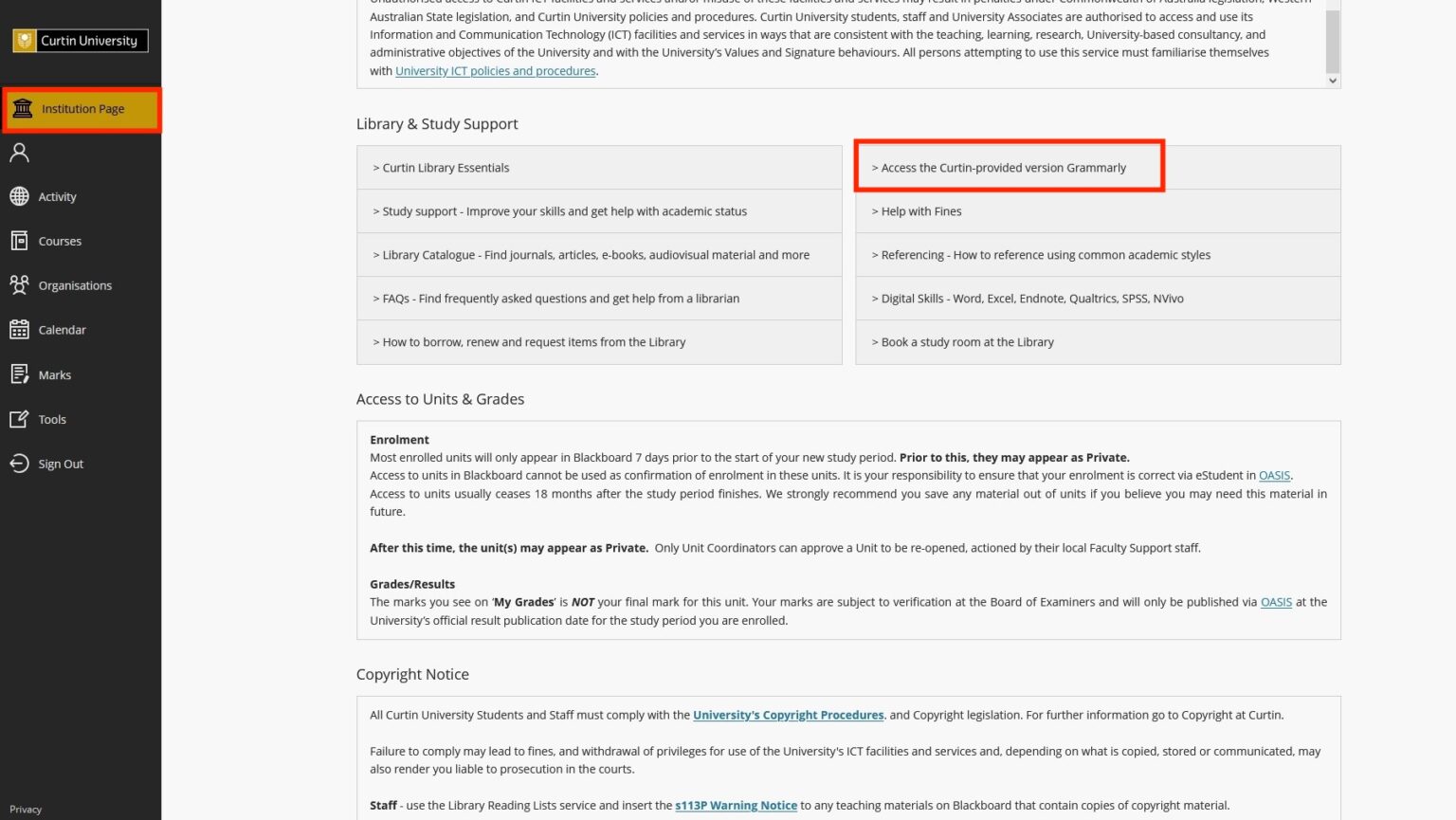
How do I get Grammarly? You can join Curtin’s Grammarly subscription via Blackboard.
- Go to the Institution Page,
- Scroll down to Library & Study Support
- Click the link to access Curtin’s Grammarly
The Curtin-provided version is the ONLY version of Grammarly permitted for use at Curtin.
Why do I need to use the Curtin-provided version of Grammarly?
Grammarly is an AI tool. It looks at your writing and gives you feedback based on the data it has been trained on.
But theres a difference between AI and Generative AI (Gen AI):
- AI (Like Curtin’s Grammarly) → checks your spelling, grammar, and clarity.
- Gen-AI (like ChatGPT or non-Curtin Grammarly) → creates new content for you, such as writing drafts, rewriting sentences, or even suggesting whole topics.
The free, premium, and business versions of Grammarly all include Gen-AI features. Using these in your assignments is not allowed unless your lecturer has specifically said you can.
The Curtin-provided Grammarly has Gen-AI switched off. That means you can safely use it for feedback on your writing without breaking any rules.
Watch this five-minute video to see how you can use Grammarly Authorship to track the creation of your assessments:
More support
If you’re looking for further help, you can connect with a Peer Academic Mentor, boost your skills with a range of workshops or online guides, or contact the Library. Check out the Curtin Library Gen-AI Guide and explore the Prompt Library – a resource for using Gen-AI to give feedback on academic writing.